
The best WordPress SEO plugin won’t always be the one with the longest features list or the most five-star reviews. It is the one your team can configure confidently, use consistently and maintain without creating major search issues. A plugin should make good SEO easier, but it can’t work miracles; you still need a strong content strategy, helpful content and a website people find easy to use.
Yoast SEO remains an excellent default for many organisations, while Rank Math, All in One SEO and SEOPress each have genuine strengths. This guide compares them based on the decisions that matter: editorial workflow, technical controls, schema, reporting, cost, privacy, support, and long-term ownership.
This Article Will Cover:
- What does a WordPress SEO plugin actually do?
- The four plugins in this comparison
- Yoast SEO: the dependable all-rounder
- Rank Math: broad functionality and granular control
- All in One SEO: a guided business toolkit
- SEOPress: flexible, professional and understated
- Feature comparison: ask what your team will really use
- Our practical verdict
- Don’t run several full SEO plugins together
- A safe SEO plugin migration checklist
- Set up the plugin around governance
- Why plugin scores are not an SEO strategy
- A WordPress agency view
- Choose once, configure carefully and focus on the audience
What does a WordPress SEO plugin actually do?
WordPress already provides a solid publishing foundation, but specialised plugins give teams greater control over how that information is searched. They can generate XML sitemaps, manage meta titles and descriptions, set canonical URLs, control indexation, add structured data and create social-sharing metadata. Some also include redirects, internal link suggestions, local SEO, WooCommerce features, analytics, and content guidance.
These tools help teams to implement and organise their decisions. They do not guarantee rankings, make every green indicator a good page or turn a target phrase into useful expertise. Search performance still depends on audience understanding, crawlable architecture, genuinely helpful content, authority, speed and a convincing experience.
The four plugins in this comparison
| Plugin | Best considered for | Notable character |
|---|---|---|
| Yoast SEO | Teams wanting familiar guidance and a mature ecosystem | Established editorial analysis and broad documentation |
| Rank Math | Users wanting many controls in a modular suite | Feature-rich free offering and integrated reporting options |
| All in One SEO | Businesses seeking a guided all-in-one toolkit | Wide range of site, local, ecommerce and audit features |
| SEOPress | Professionals valuing a clean, flexible and white-label approach | Privacy-conscious positioning and agency-friendly controls |
Features and licence tiers change regularly, so check the current terms on each platform’s official page before buying. This comparison focuses on the main differences and practical fit rather than declaring that one feature wins it all.

Yoast SEO: the dependable all-rounder
Yoast has been part of the WordPress landscape for many years and is familiar to editors, developers and agencies. Its core plugin handles essentials such as titles, canonical annotations, XML sitemaps and structured data. The page-level interface offers search appearance controls alongside content and readability feedback.
Where Yoast is strong
- A recognisable interface and substantial learning material.
- Sensible technical defaults for common WordPress sites.
- Content and readability prompts that can help less experienced editors.
- Structured data connections and controls for how pages are described.
- A mature extension and integration ecosystem.
Yoast is often a strong organisational choice because new editors may already know it and support is easy to find. The free edition covers important fundamentals, while premium products add workflow and specialist capabilities. Check the current plan for redirects, internal linking and sector-specific extensions before assuming they are included.
What to watch
Editors can become fixated on traffic-light scores. A keyphrase can be used naturally without satisfying every mechanical check, and a green score does not prove that the page answers a valuable question. Configure the plugin around the site’s content model and train people to treat analysis as a prompt, not an approval system.
Rank Math: broad functionality and granular control
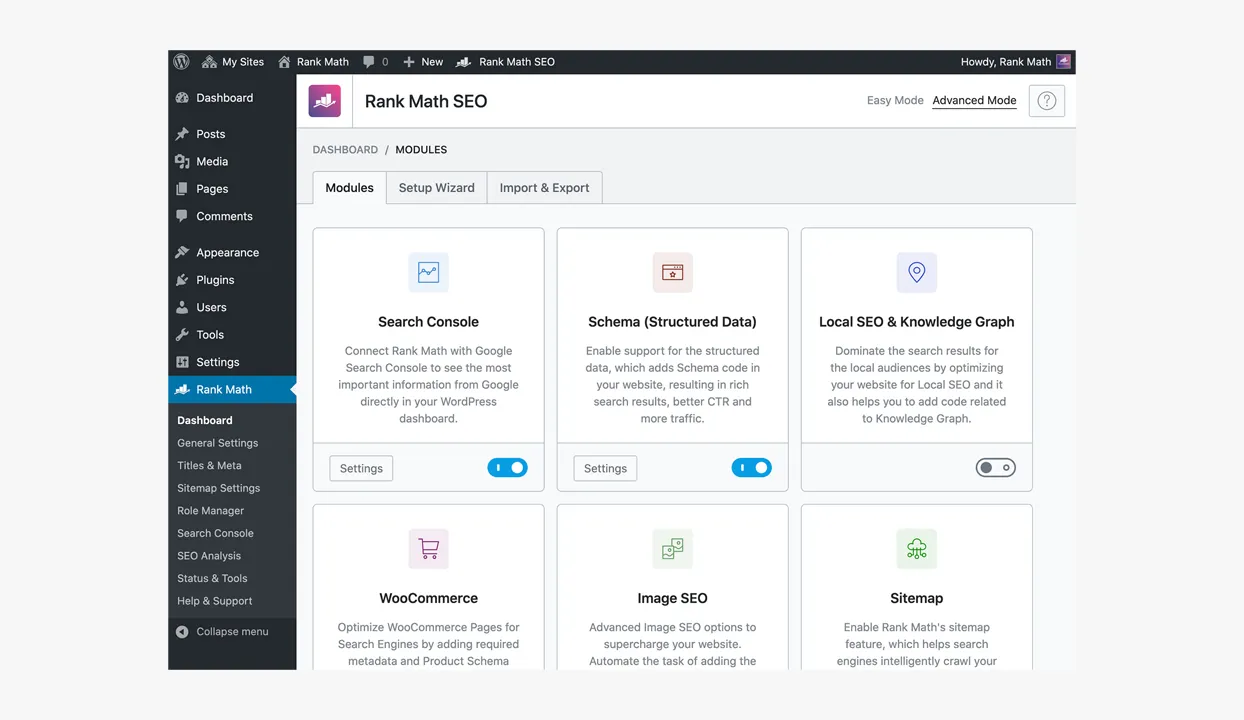
Rank Math presents a large set of SEO tools through a modular interface. Its official plugin information highlights schema options, sitemaps, content analysis, breadcrumbs, redirections, 404 monitoring, role management and integrations with Search Console and Analytics. Users can enable the modules relevant to their website.
Where Rank Math is strong
- A generous collection of controls in the core plugin.
- Modular configuration for different types of site.
- Integrated redirection and broken-URL monitoring options.
- Schema, WooCommerce and local capabilities within the wider suite.
- Migration tools for several competing SEO plugins.
This breadth can suit technically confident site owners who want a central SEO dashboard. It may reduce the need for separate tools, although consolidation should be tested rather than assumed. Review which functions involve an external account or service and how that fits the organisation’s data and access policies.
What to watch
More options create more decisions. A busy interface can encourage teams to activate functions they do not need or duplicate functionality already handled elsewhere. Establish one owner for global settings, restrict access appropriately and document which modules form part of the approved setup.

All in One SEO: a guided business toolkit
All in One SEO, usually shortened to AIOSEO, combines core metadata and sitemap controls with a wide suite of business-oriented features. Its official listing includes schema, local SEO, WooCommerce support, link assistance, redirects, audits, social metadata and Search Console integration across its available editions.
Where AIOSEO is strong
- A setup wizard and guided approach for business users.
- Broad features for local, ecommerce and content-led websites.
- Granular sitemap, robots and canonical controls.
- Integrations with popular editors, custom fields and multilingual tools.
- Import options from other major SEO plugins.
AIOSEO can be attractive to teams that want many related tasks in one product family. As with any suite, map the required features to the correct current licence level. A long list of available modules is valuable only when the website has a real use for them and the team knows how to govern them.
What to watch
Premium prompts and multiple dashboards can distract editors from their core tasks if the interface is not configured thoughtfully. Review permissions and hide irrelevant capabilities where possible. Confirm whether advanced local, ecommerce, redirection or reporting functions are included in the proposed plan.
SEOPress: flexible, professional and understated
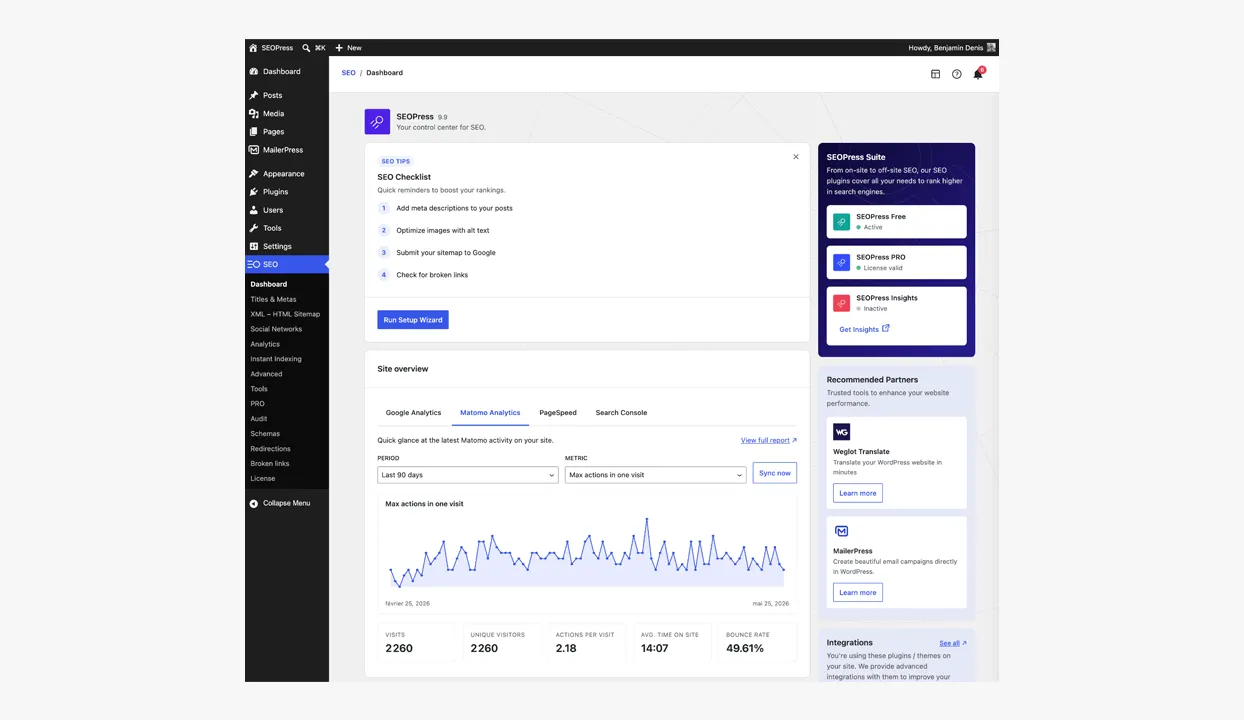
SEOPress positions itself as a privacy-conscious, white-label SEO plugin and is often considered by agencies and experienced WordPress users. It covers core metadata, sitemaps and social sharing, with its broader range offering schema, redirects, ecommerce and other advanced tools. It supports migration from several established alternatives.
Where SEOPress is strong
- A relatively clean approach to everyday SEO controls.
- White-label options that can suit managed client websites.
- Support for major editors and page-building environments.
- A broad import path for existing SEO data.
- An emphasis on privacy and professional workflow.
SEOPress can appeal to teams that want capable controls without centring the editorial experience on scores and upsells. However, “lighter” or “privacy-first” should still be verified against the exact features, external services and configuration you intend to enable.
What to watch
It may be less familiar to occasional editors than Yoast, so onboarding and documentation remain important. Confirm that specialist requirements are covered in the chosen edition and test compatibility with the actual theme, language setup, ecommerce system and custom fields.
Feature comparison: ask what your team will really use
| Decision area | Questions to ask |
|---|---|
| Metadata | Can editors control templates and individual pages without confusion? |
| Indexation | Are robots, canonical and archive settings safe and understandable? |
| Sitemaps | Can unwanted post types and taxonomies be excluded correctly? |
| Schema | Does output describe the real entity and connect cleanly across templates? |
| Redirects | Is the required manager included, logged and suitable for migration scale? |
| Ecommerce and local | Are specialist controls included in the right licence? |
| Workflow | Can contributors edit only what their role requires? |
| Data | Which external accounts, APIs or cloud services are involved? |
| Support | Who diagnoses conflicts and protects settings during updates? |
Our practical verdict
Choose Yoast SEO when you want a widely understood default, strong documentation and accessible editorial guidance. It is a sensible fit for many marketing-led WordPress websites and mixed-experience content teams.
Choose Rank Math when your team values broad built-in functionality, granular features and a highly configurable dashboard. It can suit confident users who will actively manage the setup.
Choose AIOSEO when you want a guided suite spanning core, local, ecommerce and content workflows. It can work well for businesses that prefer a single product family and have purchased the full licence.
Choose SEOPress when a clean professional interface, privacy considerations and white-labelling matter. It is particularly worth evaluating for agency-managed websites and experienced teams.
For many typical business websites, Yoast remains our comfortable starting point. The right choice can change when ecommerce, local search, multisite, multilingual content, editorial roles or agencies that need enhanced control all become bigger requirements.
Don’t run several full SEO plugins together
Two plugins generating titles, canonicals, sitemaps and schema can create duplicate or contradictory output. Pick one primary SEO suite. If a separate specialist tool is necessary, i.e. Schema Pro, to work hand-in-hand with Yoast then work of how and if two plugins can work together and test the resulting page source.
Before replacing an existing plugin, create a backup and list the current metadata, indexing rules, redirects, and schema. Use the destination plugin’s supported importer, test on a staging site and crawl the result. Keep the previous plugin disabled rather than immediately deleting it until the migration has been checked.
A safe SEO plugin migration checklist
- Back up the database and record the current configuration.
- Export data where the existing plugin provides that option.
- List title templates, social defaults, index rules and sitemap exclusions.
- Confirm how redirects and specialist schema will transfer.
- Run the official import process in a staging environment.
- Disable the old suite, so only one plugin generates SEO output.
- Inspect representative pages, archives, products and taxonomies.
- Crawl titles, descriptions, canonicals, status codes and indexability.
- Validate structured data and review the XML sitemap.
- Monitor Google Search Console and key landing pages after production release.
Set up the plugin around governance
The installation wizard is the beginning, not the strategy. Decide which post types should appear in search, how title templates work, who can edit canonical URLs and how redirects are approved. Configure organisation details, social profiles, breadcrumbs and schema. Remove obsolete archives rather than allowing every default to become indexable.
Create a short editorial guide for your whole team explaining the fields that matter. Most authors need to know how to write a useful title and description, select an appropriate canonical only in exceptional cases and interpret content suggestions sensibly. They do not need access to site-wide robots or sitemap controls.
Why plugin scores are not an SEO strategy
Content analysis can catch missing headings, unclear sentences or a missing target phrase. It cannot decide whether the topic deserves a page, whether the advice is original, whether claims are supported or whether the reader is ready to act. Formulaic optimisation can make writing repetitive and less convincing.
Use the plugin for consistent implementation and reminders. Use research, expertise, editorial judgement and user evidence to decide what the page should say. Measure qualified visits, engagement, enquiries and revenue rather than celebrating a dashboard full of green circles.
A WordPress agency view
Fhoke is a London-based UK web design agency, and WordPress sites have been at the core of our offering since day one. We’ve worked with brands from all corners of the world, and our founders have worked in agencies since 2000. We care less about winning a theoretical plugin debate than giving each client a stable setup their content team understands.
That means selecting a reputable, actively maintained plugin; configuring it for the specific content; controlling permissions; testing output; and documenting decisions. A small business may need straightforward titles and a sitemap. A global brand may need multilingual templates, custom schema, ecommerce rules and publishing guidence. The plugin should match the job.
Choose once, configure carefully and focus on the audience
Yoast, Rank Math, AIOSEO and SEOPress can all support a technically sound WordPress website. But Yoast is, and has been for a while, our dependable general recommendation, but another option may fit your team’s features and operating style better.
Trial the plugin, look at the various plans, and test the actual output before committing.
Once the essentials are done, stop chasing settings for their own sake. Publish useful content, strengthen internal links, maintain the website and learn from real search behaviour. The best SEO plugin is ultimately the one that fades into the workflow while your expertise takes centre stage.


