What are Custom Instructions?
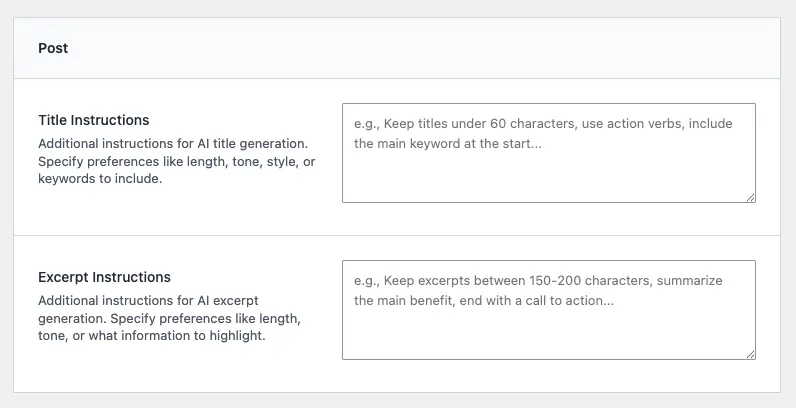
Custom instructions are additional guidelines you provide specifically for title and excerpt generation. They work alongside your brand voice and stop words to create content that meets your exact specifications.
Title Instructions control:
- Length requirements (character or word limits)
- Format preferences (questions, statements, lists)
- Keyword placement (start, middle, end)
- Style preferences (action verbs, numbers, emotional triggers)
- SEO considerations (keyword density, readability)
Excerpt Instructions control:
- Length requirements (character or word limits)
- Content focus (benefits, features, summary style)
- Structure preferences (sentences, paragraphs, bullet points)
- Call-to-action inclusion
- Tone adjustments specific to excerpts
Accessing Custom Instructions
Custom instructions are configured in the Cortex AI Main Page:
- Navigate to the Main Page – Go to Cortex AI → Main Page in your WordPress admin menu
- Find the “Post” section – Scroll down to find the section labeled “Post”
- Locate the instruction fields – You’ll see two text areas:
- Title Instructions – For customizing title generation
- Excerpt Instructions – For customizing excerpt generation
Each field includes:
- Label: “Title Instructions” or “Excerpt Instructions”
- Description: Explains what the field controls
- Placeholder text: Provides example instructions
- Text area: 4 rows tall for entering your custom instructions
Setting Custom Instructions
Basic Setup
- Click in the instruction field – The text area is ready for input
- Enter your instructions – Write clear, specific guidance for the AI
- Save your settings – Click the “Save Settings” button at the bottom of the page
- Verify the save – A success message appears confirming your settings were saved
What to Include in Title Instructions
Effective title instructions specify:
Length requirements:
- Character limits (e.g., “Keep titles under 60 characters”)
- Word limits (e.g., “Use 8-12 words maximum”)
- Examples: “Keep titles between 50-60 characters for optimal SEO”, “Limit to 10 words or less”
Format preferences:
- Question vs. statement format
- Number inclusion (e.g., “5 Ways to…”)
- Action verb usage
- Examples: “Start titles with action verbs”, “Use numbers when relevant (e.g., ‘5 Tips for…’)”, “Prefer question format for how-to content”
Keyword placement:
- Where to place main keywords
- Keyword density
- Examples: “Place the main keyword at the start of the title”, “Include primary keyword within first 5 words”, “Use secondary keywords naturally throughout”
Style preferences:
- Emotional triggers
- Power words
- Clarity requirements
- Examples: “Use power words like ‘Ultimate’, ‘Complete’, ‘Essential'”, “Make titles clear and specific, avoid vague terms”, “Include emotional triggers when appropriate”
SEO considerations:
- Readability
- Click-worthiness
- Search intent matching
- Examples: “Create titles that match search intent”, “Make titles compelling and click-worthy”, “Balance SEO keywords with readability”
What to Include in Excerpt Instructions
Effective excerpt instructions specify:
Length requirements:
- Character limits (e.g., “Keep excerpts between 150-200 characters”)
- Word limits (e.g., “Use 2-3 sentences, approximately 25-30 words”)
- Examples: “Keep excerpts between 150-200 characters”, “Write 2-3 sentences, approximately 30-40 words”
Content focus:
- What to emphasize (benefits, features, summary)
- What to include or exclude
- Examples: “Focus on the main benefit or value proposition”, “Summarize the key points without revealing everything”, “Highlight the most important information first”
Structure preferences:
- Sentence count
- Paragraph format
- Call-to-action inclusion
- Examples: “Write 2-3 sentences that flow naturally”, “End with a subtle call to action when appropriate”, “Use complete sentences, avoid fragments”
Tone adjustments:
- Excerpt-specific tone (may differ from brand voice)
- Engagement level
- Examples: “Make excerpts more engaging and curiosity-driven than the main content”, “Use a slightly more casual tone in excerpts”, “Create intrigue without being clickbait”
How Custom Instructions Work
Custom instructions are applied specifically to title and excerpt generation. Here’s how they work:
Title Generation
When you click “Generate Title” in the document panel:
- AI reads your content – Analyzes the post content you’ve written
- Applies brand voice – Uses your global brand voice for tone and style
- Applies stop words – Avoids any terms in your stop words list
- Applies title instructions – Follows your specific title requirements
- Generates the title – Creates a title that meets all criteria
Example: If your title instructions say “Keep titles under 60 characters, use action verbs, include the main keyword at the start”, the AI will generate titles that:
- Are 60 characters or less
- Start with action verbs (e.g., “Discover”, “Learn”, “Master”)
- Place the main keyword at the beginning
- Still match your brand voice and avoid stop words
Excerpt Generation
When you click “Generate Excerpt” in the document panel:
- AI reads your content – Analyzes the post content you’ve written
- Applies brand voice – Uses your global brand voice for tone and style
- Applies stop words – Avoids any terms in your stop words list
- Applies excerpt instructions – Follows your specific excerpt requirements
- Generates the excerpt – Creates an excerpt that meets all criteria
Example: If your excerpt instructions say “Keep excerpts between 150-200 characters, summarize the main benefit, end with a call to action”, the AI will generate excerpts that:
- Are 150-200 characters long
- Focus on the main benefit or value proposition
- End with a subtle call to action
- Still match your brand voice and avoid stop words
Interaction with Other Settings
Custom instructions work alongside other settings:
Brand Voice: Brand voice provides the overall tone and style; custom instructions provide specific requirements. They work together—your title will match your brand voice while also meeting your length and format requirements.
Stop Words: Stop words prevent unwanted terms; custom instructions guide desired structure. Both are applied—the AI will avoid stop words while following your instruction format.
Context Awareness: Custom instructions are applied whether context is enabled or not. Context provides content information; custom instructions provide structural requirements.
Examples of Effective Instructions
Title Instructions Examples
SEO-Focused Blog:
Keep titles under 60 characters for optimal SEO. Place the main keyword at the start when possible. Use action verbs and power words. Make titles clear, specific, and compelling. Include numbers when relevant (e.g., "5 Ways to...").
E-commerce Product Titles:
Keep titles concise, 8-12 words maximum. Include key product features or benefits. Use descriptive language that highlights value. Avoid vague terms. Make titles search-friendly while remaining readable.
News/Journalism:
Keep titles under 80 characters. Use clear, factual language. Start with the most important information. Avoid clickbait. Make titles informative and accurate.
How-To Content:
Use question format or "How to" structure when appropriate. Keep titles under 65 characters. Start with action verbs. Include the main topic keyword. Make titles specific and actionable.
B2B/Professional:
Keep titles professional and clear, 10-15 words. Use specific, benefit-focused language. Avoid jargon unless necessary. Make titles authoritative but accessible. Include key terms naturally.
Excerpt Instructions Examples
Blog Post Excerpts:
Keep excerpts between 150-200 characters. Summarize the main points in 2-3 sentences. Focus on the key benefit or value proposition. End with a subtle call to action when appropriate. Make excerpts engaging and curiosity-driven.
Product Descriptions:
Keep excerpts between 120-180 characters. Highlight the main benefit or unique selling point. Use 2-3 sentences that flow naturally. Focus on what makes the product valuable. End with an invitation to learn more.
News Articles:
Keep excerpts between 100-150 characters. Summarize the key facts in 1-2 sentences. Be clear and informative. Avoid editorializing. Focus on the who, what, when, where.
Educational Content:
Keep excerpts between 150-200 characters. Explain what readers will learn in 2-3 sentences. Use clear, accessible language. Focus on the learning outcome. Create interest without revealing everything.
B2B/Professional:
Keep excerpts between 140-180 characters. Summarize the main value proposition in 2 sentences. Use professional but accessible language. Focus on business benefits. End with a clear value statement.
Best Practices for Custom Instructions
Be Specific but Flexible
Good: “Keep titles under 60 characters, use action verbs, include the main keyword at the start when possible.”
Less effective: “Make titles good”
Specific instructions give the AI clear guidance, but including “when possible” or “when appropriate” allows flexibility when strict rules don’t make sense.
Focus on What Matters Most
Prioritize your most important requirements:
- SEO-focused sites: Emphasize length and keyword placement
- Engagement-focused sites: Emphasize compelling language and emotional triggers
- Professional sites: Emphasize clarity and specificity
Test and Refine
- Set initial instructions – Start with your most important requirements
- Generate titles/excerpts – Use the AI generator to create content
- Review the results – Check if outputs meet your expectations
- Refine instructions – Update based on what you observe
- Repeat – Continue refining until outputs consistently meet your needs
Don’t Over-Constrain
Too many strict requirements can produce rigid or unnatural results:
Too restrictive: “Titles must be exactly 55 characters, start with a number, include exactly 3 keywords, use only action verbs, and end with a question mark.”
Better: “Keep titles around 55-60 characters. Use action verbs when possible. Include the main keyword naturally. Prefer question format for how-to content.”
Align with Your Brand Voice
Ensure your custom instructions complement your brand voice:
- If brand voice is “Casual and friendly”, instructions shouldn’t require “Formal and technical” language
- If brand voice emphasizes simplicity, instructions shouldn’t require complex structures
- Instructions should enhance brand voice, not contradict it
Consider Your Content Types
Different content types may need different instructions:
- Blog posts: May need SEO-focused instructions
- Product pages: May need benefit-focused instructions
- News articles: May need factual, concise instructions
- Educational content: May need learning-outcome-focused instructions
If you publish multiple content types, consider which instructions work best for your primary content type, or adjust instructions when generating different types of content.
Common Use Cases
SEO Optimization
Goal: Create titles and excerpts optimized for search engines
Title Instructions:
Keep titles under 60 characters for optimal SEO display. Place the primary keyword at the start when possible. Use action verbs and power words. Make titles clear, specific, and search-friendly. Include numbers when relevant.
Excerpt Instructions:
Keep excerpts between 150-160 characters for optimal meta description length. Include the primary keyword naturally. Summarize the main value proposition. Make excerpts compelling and click-worthy.
Engagement and Click-Through
Goal: Create titles and excerpts that drive clicks and engagement
Title Instructions:
Use compelling, curiosity-driven language. Include emotional triggers and power words. Keep titles under 65 characters. Make titles specific and benefit-focused. Use questions or intriguing statements when appropriate.
Excerpt Instructions:
Keep excerpts between 150-200 characters. Create intrigue without being clickbait. Focus on the main benefit or value. End with a subtle call to action. Make excerpts engaging and curiosity-driven.
Professional/B2B Content
Goal: Create titles and excerpts that convey authority and professionalism
Title Instructions:
Keep titles professional and clear, 10-15 words. Use specific, benefit-focused language. Avoid jargon unless necessary. Make titles authoritative but accessible. Include key business terms naturally.
Excerpt Instructions:
Keep excerpts between 140-180 characters. Summarize the main value proposition in 2 sentences. Use professional but accessible language. Focus on business benefits and outcomes. End with a clear value statement.
E-commerce/Product Content
Goal: Create titles and excerpts that highlight product value
Title Instructions:
Keep titles concise, 8-12 words. Include key product features or benefits. Use descriptive language that highlights value. Make titles search-friendly while remaining readable. Avoid vague terms.
Excerpt Instructions:
Keep excerpts between 120-180 characters. Highlight the main benefit or unique selling point. Use 2-3 sentences that flow naturally. Focus on what makes the product valuable. End with an invitation to learn more.
Troubleshooting
Instructions Not Being Applied
If generated titles or excerpts don’t follow your instructions:
- Check your instructions – Ensure they’re clear and specific enough
- Verify settings are saved – Make sure you clicked “Save Settings” after entering instructions
- Review for conflicts – Instructions shouldn’t contradict each other or your brand voice
- Test with different content – Some content may be harder to fit into strict requirements
Conflicting Requirements
If your instructions conflict with each other:
Example conflict: “Keep titles under 50 characters” and “Include the main keyword, a number, an action verb, and a power word”
Solution: Prioritize your most important requirements and make others flexible:
Keep titles under 60 characters. Include the main keyword at the start when possible. Use action verbs and power words when appropriate. Include numbers when relevant.
Too Restrictive Instructions
If generated titles or excerpts feel rigid or unnatural:
- Add flexibility – Use “when possible” or “when appropriate” for optional requirements
- Reduce requirements – Focus on your 2-3 most important requirements
- Test different instructions – See which requirements produce the best results
- Allow natural variation – Don’t require exact formats for every title
Instructions Override Brand Voice
If custom instructions seem to override your brand voice:
- Review instructions – Ensure they don’t contradict your brand voice
- Make instructions complementary – Instructions should enhance brand voice, not replace it
- Test without instructions – Generate titles/excerpts with only brand voice to compare
- Adjust instructions – Modify instructions to work with your brand voice
Length Requirements Too Strict
If the AI struggles to meet length requirements:
- Provide a range – Use “between 50-60 characters” instead of “exactly 55 characters”
- Prioritize content over length – Make length a guideline, not a strict rule
- Test different lengths – See what length works best for your content
- Consider content type – Some topics need longer titles/excerpts than others
Next Steps
Now that you’ve configured custom title and excerpt instructions:
- Test your instructions – Generate titles and excerpts to see how they work
- Refine based on results – Update instructions as you learn what works best
- Combine with brand voice – Ensure instructions complement your Brand Voice settings
- Use with stop words – Combine instructions with Stop Words for complete control
- Generate content – Use the AI Title Generator in the document panel
Custom instructions give you fine-grained control over title and excerpt generation. Start with your most important requirements, test the results, and refine over time to create content that perfectly matches your needs.