Accessing the Post Title Generator
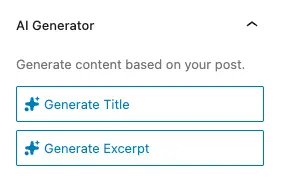
The post Title Generator appears in the post settings panel (the sidebar) when editing any post or page in the block editor (Gutenberg), and in the toolbar at the top of the page:
- Open the sidebar – Click the gear icon (⚙️) in the top-right corner of the editor, or use the keyboard shortcut
Ctrl+Shift+,(Windows/Linux) orCmd+Shift+,(Mac) - Find the “AI Generator” panel – Scroll down in the sidebar to locate the panel titled “AI Generator”
- View available options – You’ll see two buttons:
- Generate Title – Creates a new title based on your content
- Generate Excerpt – Creates an excerpt (only shown if your post type supports excerpts)
The panel includes a brief description: “Generate content based on your post.” This indicates that the AI analyzes your entire post to create contextually appropriate titles and excerpts.
Generating a Title
Basic Usage
- Add content to your post – Write at least one paragraph or add some blocks to your post.
- Click “Generate Title” – The button shows a sparkles icon (✨) to indicate AI functionality
- Wait for processing – A modal window appears showing “Generating title…” with a loading spinner
- Review the suggestion – Once complete, the modal displays the AI-generated title
- Apply or discard – Click “Apply” to use the title, or “Discard” to close without changes
How Title Generation Works
When you generate a title, the AI:
- Analyzes your post content – Reads through all blocks in your post (up to 100 blocks)
- Considers post metadata – Takes into account categories, tags, and existing excerpt (if any)
- Excludes the current title – The AI ignores your existing title to generate a fresh one based purely on content
- Applies your brand voice – Uses your configured brand voice settings for tone and style
- Follows custom instructions – Incorporates any title-specific instructions you’ve set in the plugin settings
The generated title is designed to be:
- SEO-friendly – Optimized for search engines while remaining readable
- Engaging – Compelling enough to encourage clicks
- Accurate – Reflects the actual content of your post
- Appropriate length – Typically follows best practices for title length (unless you’ve specified otherwise in custom instructions)
Applying a Generated Title
After reviewing the AI-generated title:
- Click “Apply” – This updates your post’s title field immediately
- The modal closes – You return to the editor with the new title in place
- Edit if needed – You can manually adjust the title after applying it
The title appears in:
- The post editor’s title field (at the top of the editor)
- WordPress admin post lists
- Frontend displays (depending on your theme)
- SEO plugins and meta tags
Generating an Excerpt
Basic Usage
The excerpt generator works similarly to title generation:
- Ensure your post type supports excerpts – Not all post types have excerpts enabled. Standard posts and pages typically support them, but custom post types may not.
- Add content to your post – The Generate Excerpt button requires content to analyze
- Click “Generate Excerpt” – The button appears below “Generate Title” in the AI Generator panel
- Review the suggestion – The modal shows the generated excerpt in a scrollable area
- Apply or discard – Accept the excerpt or close without changes
How Excerpt Generation Works
The excerpt generator:
- Summarizes your content – Distills your post into a concise overview
- Highlights key points – Focuses on the most important information
- Maintains readability – Creates natural, flowing text (not just keyword stuffing)
- Excludes the current excerpt – Ignores any existing excerpt to generate fresh content
- Respects length preferences – Follows your custom excerpt instructions for length and style
- Uses brand voice – Applies your configured tone and style
The generated excerpt is ideal for:
- Meta descriptions – Used by search engines and social media
- Post previews – Displayed in archives, categories, and search results
- RSS feeds – Shown in feed readers
- Social sharing – Used when sharing posts on social platforms
Applying a Generated Excerpt
- Click “Apply” – Updates your post’s excerpt field
- The modal closes – You return to the editor
- Verify the excerpt – Check how it appears in your theme’s excerpt display
Note: Some themes may use the excerpt differently, or may auto-generate excerpts from content if none is provided. The AI-generated excerpt gives you full control over what appears.
Customizing Title and Excerpt Generation
You can customize how the AI generates titles and excerpts by setting custom instructions in the plugin settings. These instructions guide the AI to produce results that match your specific needs.
Accessing Custom Instructions
- Go to plugin settings – Navigate to Cortex AI → Main Page in your WordPress admin
- Find the “Post” section – Scroll to the section labeled “Post”
- Configure instructions – You’ll see two text areas:
- Title Instructions – Customize title generation
- Excerpt Instructions – Customize excerpt generation
Title Instructions
Title instructions allow you to specify preferences for AI-generated titles. Examples include:
Length preferences:
- “Keep titles under 60 characters”
- “Generate titles between 50-70 characters”
- “Create short, punchy titles under 50 characters”
Style preferences:
- “Use action verbs at the start”
- “Include questions when appropriate”
- “Use numbers and lists (e.g., ‘5 Ways to…’)”
- “Avoid clickbait-style titles”
SEO preferences:
- “Include the main keyword at the beginning”
- “Focus on long-tail keywords”
- “Match search intent for the topic”
Tone preferences:
- “Keep titles professional and formal”
- “Use conversational, friendly language”
- “Match the brand voice exactly”
Format preferences:
- “Use title case”
- “Capitalize all major words”
- “Keep it lowercase except for proper nouns”
Example title instructions:
Keep titles under 60 characters, use action verbs, include the main keyword at the start, and match our professional brand voice.
Excerpt Instructions
Excerpt instructions customize how excerpts are generated. Examples include:
Length preferences:
- “Keep excerpts between 150-200 characters”
- “Generate 2-3 sentence excerpts”
- “Create brief summaries under 160 characters”
Content preferences:
- “Summarize the main benefit or value proposition”
- “Highlight the key takeaway”
- “Focus on what the reader will learn”
- “Include a call to action at the end”
Style preferences:
- “Write in the first person”
- “Use active voice”
- “End with a question to encourage clicks”
- “Include specific numbers or statistics when available”
Tone preferences:
- “Match the post’s tone exactly”
- “Keep excerpts professional”
- “Use engaging, conversational language”
Example excerpt instructions:
Keep excerpts between 150-200 characters, summarize the main benefit, end with a call to action, and use engaging language.
How Custom Instructions Work
Custom instructions are:
- Always applied – Used for every title and excerpt generation
- Combined with brand voice – Work together with your brand voice settings
- Context-aware – The AI still analyzes your content, but follows your instructions
- Flexible – You can update them anytime, and changes apply to future generations
Best practices for instructions:
- Be specific about what you want
- Include length requirements if important
- Mention style preferences that matter to your brand
- Update instructions based on results (refine over time)
- Keep instructions concise but clear
Best Practices for AI-Generated Titles
Writing Effective Titles
While the AI generates titles automatically, understanding what makes a good title helps you evaluate and refine suggestions:
Length considerations:
- SEO titles: 50-60 characters display fully in search results
- Social media: 60-100 characters work well for most platforms
- Email subject lines: 40-50 characters often perform best
- Blog post titles: Can be longer (60-100 characters) for clarity
Engagement factors:
- Clarity – Readers should understand what the post is about
- Relevance – Title must match the actual content
- Curiosity – Intriguing without being misleading
- Value – Communicate what readers will gain
- Keywords – Include relevant search terms naturally
Common title patterns:
- How-to guides: “How to [Achieve Goal] in [Timeframe]”
- Lists: “[Number] Ways to [Achieve Goal]”
- Questions: “Is [Topic] Right for You?”
- Problem-solution: “[Problem]? Here’s How to Fix It”
- Comparison: “[Option A] vs [Option B]: Which is Better?”
Reviewing AI Suggestions
Always review AI-generated titles before applying:
- Check accuracy – Does the title accurately represent your content?
- Verify length – Is it an appropriate length for your use case?
- Assess engagement – Will it encourage clicks without being clickbait?
- Review keywords – Are relevant keywords included naturally?
- Test readability – Is it clear and easy to understand?
- Match brand voice – Does it align with your brand’s tone?
Refining Generated Titles
If a generated title is close but not perfect:
- Apply the suggestion – Start with the AI-generated title
- Edit manually – Make small tweaks to improve it
- Regenerate if needed – Try generating again if the first attempt isn’t close
- Combine approaches – Use AI for inspiration, then craft your own
Common Title Generation Scenarios
Blog posts:
- Generate multiple options by regenerating
- Choose the most engaging option
- Ensure it includes your target keyword
- Verify it matches your content’s angle
Product descriptions:
- Focus on benefits, not just features
- Include product type or category
- Keep it scannable and clear
- Match your brand’s product naming style
News articles:
- Prioritize clarity and accuracy
- Include key information (who, what, when)
- Keep it factual and objective
- Avoid sensationalism
Tutorials and guides:
- Clearly indicate the topic
- Mention the skill level if relevant
- Include outcome or benefit
- Use action-oriented language
Best Practices for AI-Generated Excerpts
Writing Effective Excerpts
Effective excerpts serve multiple purposes:
SEO and discovery:
- Meta descriptions – Appear in search results (ideally 150-160 characters)
- Social previews – Used when sharing on social media
- RSS feeds – Displayed in feed readers
- Archive pages – Shown in category and tag listings
User engagement:
- Preview content – Give readers a taste of what’s inside
- Set expectations – Help readers know if the post is relevant
- Encourage clicks – Compel readers to read the full post
- Highlight value – Communicate what readers will gain
Reviewing AI Suggestions
When reviewing generated excerpts:
- Check completeness – Does it summarize the key points?
- Verify length – Is it appropriate for your use case?
- Assess clarity – Is it easy to understand?
- Review accuracy – Does it accurately represent your content?
- Test engagement – Will it encourage readers to click?
- Match tone – Does it align with your brand voice?
Common Excerpt Scenarios
Blog posts:
- Summarize the main point or takeaway
- Include the key benefit for readers
- End with a hook or question
- Keep it scannable and engaging
Product pages:
- Highlight the main benefit or feature
- Include the target audience
- Mention the problem it solves
- Keep it benefit-focused, not feature-focused
News articles:
- Summarize the key facts
- Include the most important information
- Keep it objective and factual
- Answer the “who, what, when, where” questions
Tutorials:
- State what readers will learn
- Mention the skill level required
- Include the time investment
- Highlight the outcome or result
Troubleshooting
Generate Buttons Are Disabled
If the “Generate Title” or “Generate Excerpt” buttons are disabled:
- Add content first – You need at least one block of content in your post
- Check post type – Some post types don’t support excerpts (the button won’t appear)
- Refresh the page – Try reloading if you just added content
Poor Quality Suggestions
If generated titles or excerpts don’t meet your expectations:
- Review your content – Ensure your post has clear, well-structured content
- Check custom instructions – Verify your title/excerpt instructions are clear and appropriate
- Review brand voice – Ensure your brand voice settings align with your goals
- Try regenerating – Generate multiple times to see different options
- Refine instructions – Update your custom instructions based on results
Generation Fails or Errors
If you see an error when generating:
- Check API keys – Verify your AI provider API keys are configured correctly
- Review error message – The modal will show specific error details
- Check network – Ensure your site can reach AI provider APIs
- Try again – Some errors are temporary and resolve on retry
- Verify provider status – Check if your AI provider is experiencing issues
Excerpt Button Not Appearing
If you don’t see the “Generate Excerpt” button:
- Check post type support – Your post type may not support excerpts
- Verify theme support – Some themes disable excerpts for certain post types
- Check WordPress settings – Ensure excerpts are enabled in your WordPress configuration
Next Steps
Now that you’re comfortable generating titles and excerpts:
- Set your brand voice – Configure brand voice settings to ensure titles and excerpts match your tone
- Try text transformations – Explore Using AI in the Block Editor for paragraph-level AI features
- Explore other features – Discover AI capabilities in ACF Fields and WooCommerce
The title and excerpt generator is just one way Cortex helps you create better content. Combine it with other AI features throughout WordPress for a complete content creation workflow.