
You should consider migrating from WooCommerce to Shopify when managing the ecommerce stack is creating more operational stress and adding time to your precious day, and when Shopify’s managed platform begins to fit how your team now sells and scales. Growth alone is not a reason to move. If WooCommerce remains stable, flexible and commercially effective, optimising the existing store may be the better decision.
Stay on WooCommerce or consider Shopify?
| Stay with WooCommerce when… | Consider Shopify when… |
|---|---|
| WordPress content flexibility is strategically important | Commerce operations dominate the website |
| Your current store is stable and maintainable | Day-to-day platform maintenance is becoming a distraction |
| Bespoke WordPress functionality is valuable | The team wants a more managed ecommerce platform |
| Your hosting and plugin stack is working well | The existing stack has become unnecessarily complex |
| Your internal/agency team is comfortable owning the stack | The merchant wants more operational responsibility handled by the platform |
| There is no clear commercial case for replatforming | The benefits of moving outweigh migration cost and risk |
1. Do not migrate just because Shopify is fashionable
Replatforming introduces cost, risk and organisational work. Products, customer data, historical orders, content, URLs, redirects, analytics and integrations can all be affected. A platform migration needs a business case. If the current WooCommerce store performs well and the team can operate it efficiently, staying put may be the smarter decision.
2. Signs WooCommerce may be creating friction
- The team spends too much time managing the website rather than merchandising and growth.
- The hosting, plugin and update stack has become difficult to govern.
- Routine ecommerce changes require more technical intervention than the business wants.
- Product and order operations no longer fit comfortably with the existing setup.
- The store has accumulated extensions or customisations that increase maintenance risk.
- The business now values a managed ecommerce ecosystem more highly than WordPress-level control.
3. When staying on WooCommerce is better
WooCommerce remains a strong platform when WordPress is central to the wider digital strategy. Content-heavy brands, specialist publishers and businesses with unusual WordPress functionality can benefit from keeping content and commerce in one flexible environment. A migration that removes useful flexibility without solving a meaningful problem is not progress.
4. What Shopify changes operationally
Shopify changes the ownership model. Hosting and much of the underlying ecommerce platform are managed as part of the service. For the right merchant, that can mean less attention spent on infrastructure and more attention spent on products, customers and growth. Fhoke’s Shopify service also positions migration and replatforming as a core capability for merchants moving from WooCommerce, Magento and BigCommerce.
5. What you may give up when leaving WooCommerce
- Some of the openness and server-level control of a self-hosted WordPress stack.
- WordPress’s exceptionally flexible content architecture as the native centre of the site.
- Existing plugins, bespoke integrations or workflows that may need Shopify equivalents or redevelopment.
- Familiar editorial and operational processes that the team has built around WordPress.
6. A WooCommerce-to-Shopify migration is more than products
A proper migration plan should account for the entire trading and search footprint, not simply the product catalogue.
- Products, variants, collections/categories and media
- Customer accounts and customer data
- Historical order data where required
- Editorial and supporting content
- Discounts, shipping, tax and payment configuration
- Third-party integrations and apps
- Analytics, advertising and conversion tracking
- Domain and DNS planning
- Existing URLs and a complete redirect map
- Search metadata, canonicals, structured data and XML sitemaps
- Testing, launch sequencing and rollback/contingency planning
7. SEO is one of the biggest migration risks
WooCommerce and Shopify do not necessarily generate the same URL structures. A migration, therefore, requires a page-by-page URL inventory and a redirect plan. Protect important product, category and content URLs, preserve useful metadata where appropriate, check canonicals and structured data, submit the new sitemap and monitor indexing after launch. Do not allow a platform move to become an accidental site-wide URL reset.
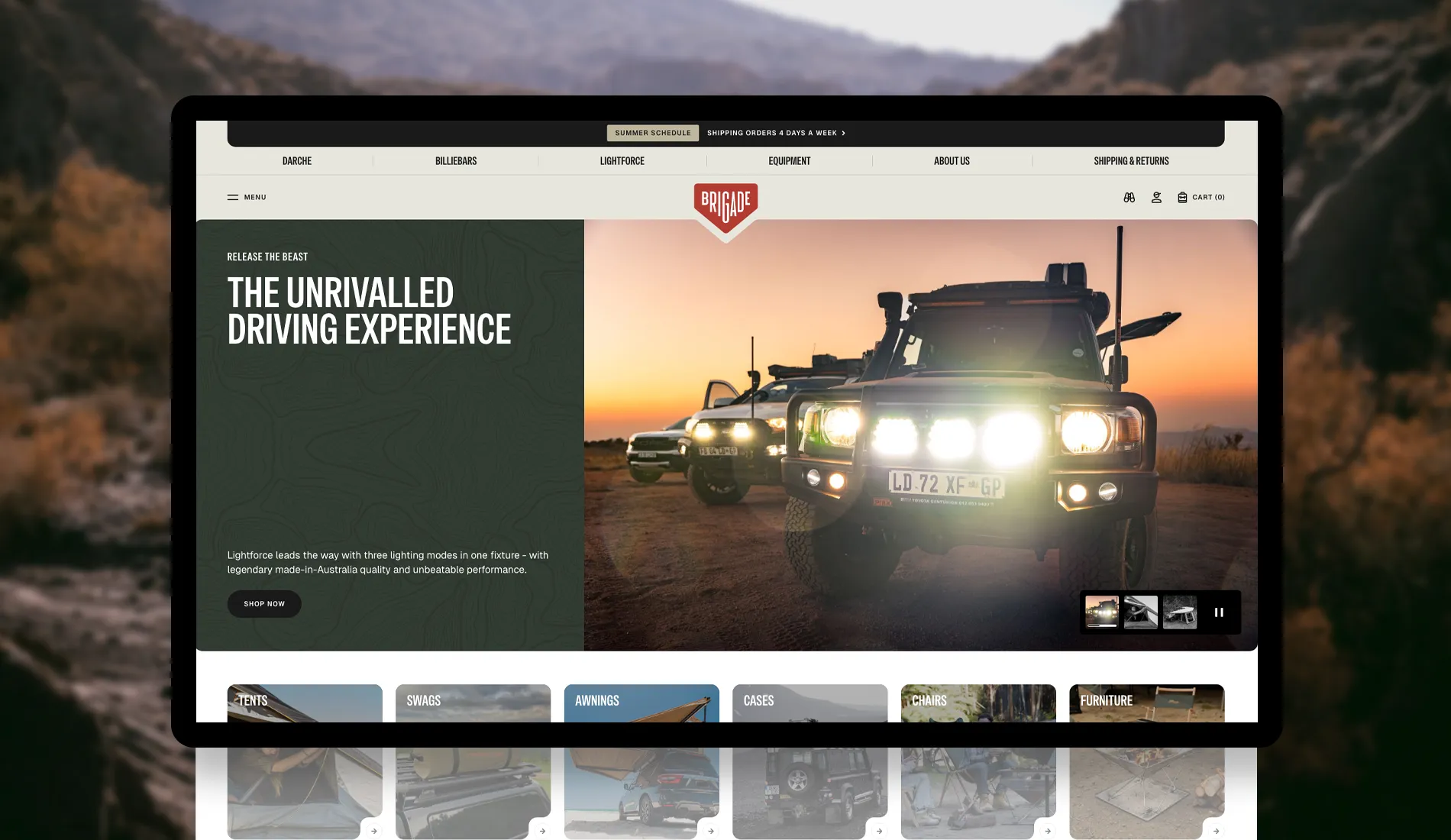
Brigade Overland migrates after five years
Fhoke first worked with Brigade Overland in 2021, creating its visual identity and a bespoke WooCommerce store. The original store gave the start-up the flexible eCommerce foundation it needed to establish the brand and grow.
By 2026, Brigade had expanded its product range and customer base. The business had outgrown the original WooCommerce setup, and Shopify’s current capabilities better matched the way Brigade wanted to manage products and scale. Fhoke then designed and developed a bespoke Shopify theme for Brigade.
The migration included products, customer accounts and historical order data. We also had to plan SEO, redirects, and content so that platform changes didn’t disrupt trading or the customer experience.
The important lesson: WooCommerce did not fail
This is what makes Brigade useful evidence. WooCommerce was not an unsuccessful first platform. It supported Brigade from launch through five years of growth. The later move to Shopify reflected a different stage of the business and a different set of operational priorities.
Fhoke’s view
A successful WooCommerce website does not have to remain a WooCommerce store forever. The platform should serve the business, not the other way around. We originally built Brigade Overland on WooCommerce because it suited the company at launch. Five years later, Shopify matched how the team wanted to operate and grow. The migration was not evidence that WooCommerce had failed; it was evidence that the requirements had changed.
If you’re still wondering what’s next, we compare WooCommerce vs Shopify and explain which is better and why.
Questions to answer before deciding
- What specific problems would moving to Shopify solve?
- Can those problems be solved more cheaply by improving the existing WooCommerce store?
- Which WordPress functionality or content flexibility would we lose?
- Which current plugins and integrations need equivalents?
- What data must be migrated and retained?
- How many important URLs will change?
- What is the SEO and analytics migration plan?
- Who owns testing and data validation?
- How will the team operate differently after launch?
- Does the expected operational benefit justify the cost and risk of replatforming?
Frequently asked questions
Is Shopify always better for a growing ecommerce business?
No. Growth alone shouldn’t decide the platform choice. A well-built WooCommerce store can support substantial businesses. Shopify becomes attractive when its managed platform and ecommerce ecosystem fit the merchant’s requirements better than WooCommerce, and vice versa, in fact.
Can you migrate orders and customer accounts from WooCommerce to Shopify?
Yes. The exact migration method depends on the store and data requirements. In Fhoke’s Brigade Overland project, products, customer accounts and historical order data were migrated from WooCommerce to Shopify.
Will migrating from WooCommerce to Shopify hurt SEO?
It can if URLs, redirects, metadata and indexing are handled poorly. SEO migration planning should be part of the project from the beginning, not an afterthought at launch.
Should we redesign at the same time as replatforming?
Not automatically. Brigade’s redesign deliberately evolved the existing brand rather than dumping everything customers already recognised. The right level of redesign depends on what is working and what genuinely needs to change.


